
Dosing Pump Not Detected After Firmware Update

Saretta8473

New member
Dec 26, 2025
7
0
1
Hello Chihiros Support Team,
I need urgent assistance with my Chihiros 4-dosing pump. During a recent firmware update, the update got stuck, and now the pump is no longer detected by the My Chihiros app or any BLE scanner.


Here are the details of my device:
  • Model: [inserisci modello, es. DP‑4]
  • Serial Number: 8835022662
  • Issue: Firmware update was interrupted; pump does not appear in app; no BLE signal detected
  • Troubleshooting attempted: power cycle (10 minutes), reinstalled app, BLE scanning — nothing worked
Please advise on how to recover the pump!

I also want to mention that I have a second aquarium with a second dosing pump, and I have not performed the firmware update on that second pump to avoid the same problem.


Thank you for your assistance:
Please advise on how to recover the pump, as this is affecting my aquarium maintenance

Regards!

Sara
 
Cannot interrupt during firmware updates.
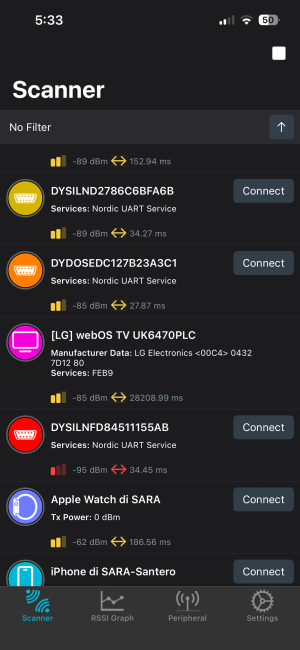
Totally close the app My Chihiros from phone backend. Download an app nRF Connect to scan all the devices, take screenshots of all the devices it finds on Scanner page.
 
Hi Admin.
As I already mentioned, NRF Scanner does not detect the dosing pump on which the firmware update stopped.

In fact, I have two tanks with two lamps and two dosing pumps, but unfortunately NRF Scanner only finds two lamps and just one dosing pump.
 

Attachments

  • IMG_7606.png
    IMG_7606.png
    369.2 KB · Views: 5
  • IMG_7605.png
    IMG_7605.png
    406.6 KB · Views: 5
Could you please clarify what you mean by “totally close the app from the phone backend”? On iOS, an app can only be fully closed manually from the multitasking screen.


For your information, I already force-closed the “My Chihiros” app from the multitasking menu, and I also powered off and restarted my iPhone 13.

Regarda
 
Hi Admin.
As I already mentioned, NRF Scanner does not detect the dosing pump on which the firmware update stopped.

In fact, I have two tanks with two lamps and two dosing pumps, but unfortunately NRF Scanner only finds two lamps and just one dosing pump.
What about other Ids?
Is there a device ID "DfuTarg"?
 
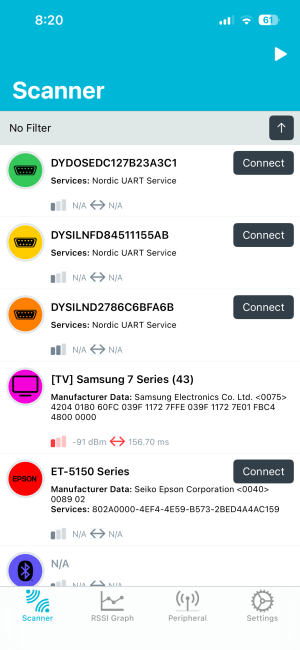
hi Admin, the device list is shown in the screenshots I sent. There are some devices marked as N/D and I don’t know what they are, but there is no device named “DfuTarg”.
 
If there is no DfuTarg, that's not a firmware update problem.
If the power adapter works normally, it could be a problem of bluetooth module inside. Check the back of the pump, is there a flashing blue indicator inside?
 
hi Admin, the device list is shown in the screenshots I sent. There are some devices marked as N/D and I don’t know what they are, but there is no device named “DfuTarg”.

The NRF scanner list is updated this morning. If the dosing pump is not in DFU mode, is there any possibility of recovery?
 

Attachments

  • IMG_7614.png
    IMG_7614.png
    384.1 KB · Views: 1
  • IMG_7615.png
    IMG_7615.png
    362.4 KB · Views: 1
  • IMG_7616.png
    IMG_7616.png
    353 KB · Views: 2
I have been using this dosing pump for just under two years and have never had any problems before this firmware update.
 
Top