App not able to connect to devices

joeyly926

New member
Mar 16, 2026
4
0
1
My phone used to be able to connect to my devices just fine. Now, it's unable to connect to either my CO2 tank nor light via bluetooth. I've tried power cycling the devices, but they still won't show up in the app. I have a Google Pixel 9A.

I've tried:
  1. power cycling the devices
  2. enabling bluetooth
  3. enabling location, "nearby devices" permissions for the app. (GPS does not show up as a separate permission).
 
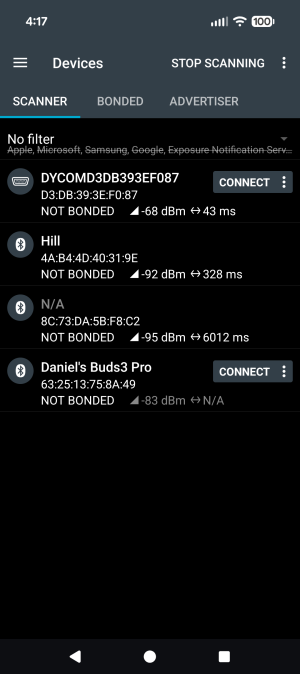
Download an app nRF Connect, scan all devices and take screenshots of the Scanner page.
 
I believe the first DYCOMB... entry is the light. The light is connectable and configurable only if I remove it from the app, power cycle the device, and add it back the first time. Subsequent access to the app renders the light inconfigurable. The bluetooth on the CO2 tank doesn't seem to be discoverable at all.
 

Attachments

  • Screenshot_20260318-161703.png
    Screenshot_20260318-161703.png
    157.2 KB · Views: 4
I only have the CO2 tank and the light. As for other bluetooth devices in my household, I have my TV (named Hill) and my Google Nest (not discoverable at the time of scanning). For the two other devices in my screenshot, they don't belong to me.
 
Delete the device from Device list page, unplug the power for a few minutes then plug back in to search.
 
That doesn't work, I've tried power cycling my devices before posting here.

1. Just to reiterate, the CO2 bluetooth is still not discoverable at all. Thus it can't be removed from the Device list page as it never shows up in the first place.
2. The light's bluetotoh device can be power cycled, but I have to remove it from the device list and power cycle it each time I need to make a change. It does not stay confiurable.
 
Top